


These tips and tricks should help to kick-start with Eclipse ADT:
- Run an application using Alt + F8 and no need to open SAP GUI
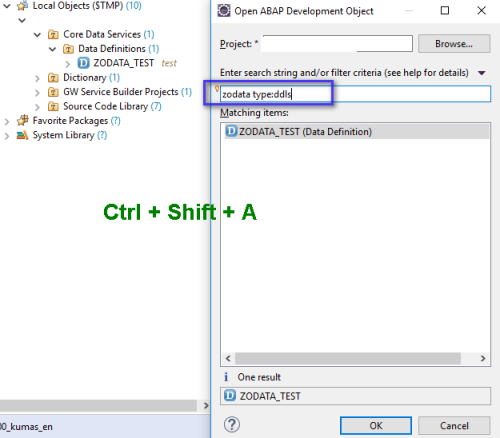
- Use Ctrl + Shift + A to select and open an Object and no need to go to Project explorer or SAP GUI
- For Version comparison of code, Use Right click on code > Compare with
- Project properties (Right click on Project > Properties) and Eclipse global properties (Menu > Window > Properties) has differences in visibility of settings
- There are a lot of differences between 7.4 and 7.5 versions, so don’t get confused if some functionalities are missing in Eclipse if they are not meant for 7.4
- SAP GUI can be used inside Eclipse if there is no native Perspective/Editor present in Eclipse. This can be opened using Alt + F8(preferred) or Ctrl + 6
- All shortcuts available in Eclipse can be checked using Ctrl + Shift + L
- If you mess up with Editor layout (e.g. Close/minimize/maximize Editor and views) and don’t know how to retrieve old layout, use Menu > Windows > Perspective > Reset Perspective
- Use Menu > Help > Check for updates for update Eclipse regularly. This provides latest and greatest features of Eclipse directly to developer
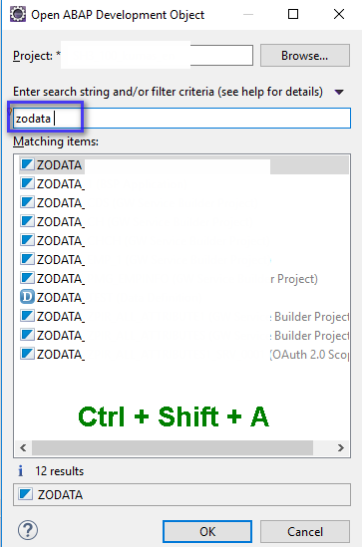
- Quick Searching tip with Shift + Ctrl + A:
If only Search string is provided, many results may come.
Providing Object type along with Search String is a good idea as it further filters the search: