




What is ABAP Templates:
- ABAP Design templates help programmers to create/modify standard as well as custom code/comment snippets
- Every project follows certain design templates as per established coding standards
- Design templates should be shared across the team and imported to the Eclipse of every developer and use them for different kind of coding constructs
- ABAP templates complement the “Pattern” available in SAP GUI development workbench.
How to access ABAP templates:
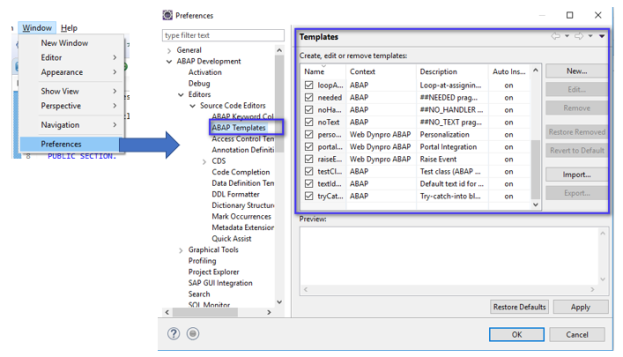
ABAP templates can be Created new as per project convention, can be edited, removed, Exported and Imported.
Template Creation Steps:
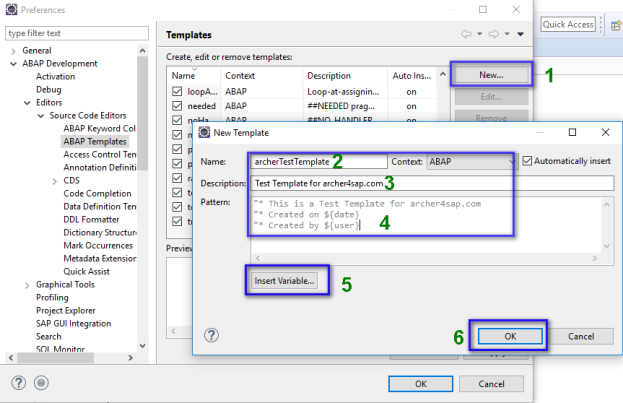
Steps:
- Click New button
- Enter Name of ABAP Template
- Enter Description of Template
- Enter Pattern
- Take help of Variables if contextual dynamic variables to be inserted in Pattern
- Click OK
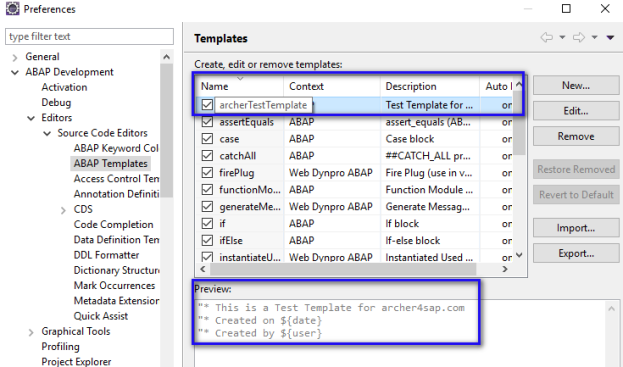
- ABAP Template is created as below:
How to use ABAP Template:
- Open any code where template to be applied.
- Enter initial letters of Template and Press Ctrl + Space for auto assistance
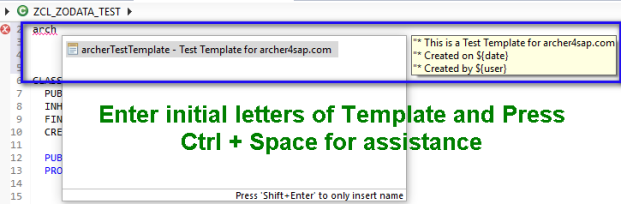
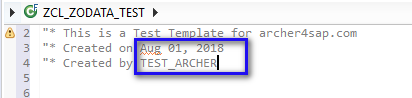
3. Use arrow keys to select correct template and press Enter. Template is inserted as below:
Note: There are Import and Export options available to share and reuse templates across the team.